Comprehensive User Guide
Welcome to Voosh - The One-Stop Solution for Restaurant Operators to Manage and Grow Their Business on Third-Party Delivery Platforms. This user guide is designed to provide you with a step-by-step walkthrough of the Voosh dashboard, its features, functionalities, and best practices to enhance your operations and drive business success.
Summary
This user guide is designed to provide you with a step-by-step walkthrough of the Voosh dashboard, its features, functionalities, and best practices to enhance your operations and drive business success.
Getting Started
Before diving into the dashboard's functionalities, click here to navigate to the login page. Enter your user ID and password and click on 'Login' to access the dashboard.Upon logging in, you'll arrive at the 'Overview' page—a snapshot of your key metrics. On the left side of the dashboard, you will find a range of modules:
Overview Dashboard
Date & Location Filters: Customize the data displayed using the date range selector, store location, and brand selectors. Choose your channels, be it DoorDash, UberEats, GrubHub, or view them all collectively.

Features:
- Key Metrics: The following key performance indicators (KPIs) are displayed:
- Total Orders (with city-wise breakdown)
- Total Sales
- Average Rating
- Net Payable
- Online Rate
- Visualized Sales & Order Trends: A dynamic graph illustrating your sales and order trajectory. This helps in quickly gauging business performance.
- Deductions Breakup: With Voosh's dashboard, FarmBurger delved deep into the details. They could now differentiate whether an issue was due to a wrong order, incorrect quantity, or a missing item, granting them the ability to act promptly and decisively.
- Feedback Inspection: Within just 15 days, FarmBurger noticed a 6.81% reduction in error charges, a testament to the enhanced clarity and improved processes.
Sales & Analysis
Features:
- Daily Sales Data: This module presents a daily snapshot. (Note: Financial figures in the “Finance” dashboard are updated weekly by delivery platforms.)
- Delivered Orders (by channel)
- Total Sales
- Canceled Orders
- Items Sold
- Trend Graphs: These visual aids detail out sales and order trends, ensuring you're always in sync with business performance.
- Item-Wise Sales Chart: Pinpoint your top and bottom-selling items. Understand growth or degrowth trends to adjust menu offerings accordingly.
- Order Cancellation Insights:: Dive into cancellations, understanding reasons and channels responsible.
- Revenue Breakup:: Understand which delivery channel is most lucrative, allowing for strategic adjustments.
Operations Quality

Features:
- Operational KPIs: Track issues such as:
- Inaccurate Orders
- Error Charges
- Unfulfilled Orders
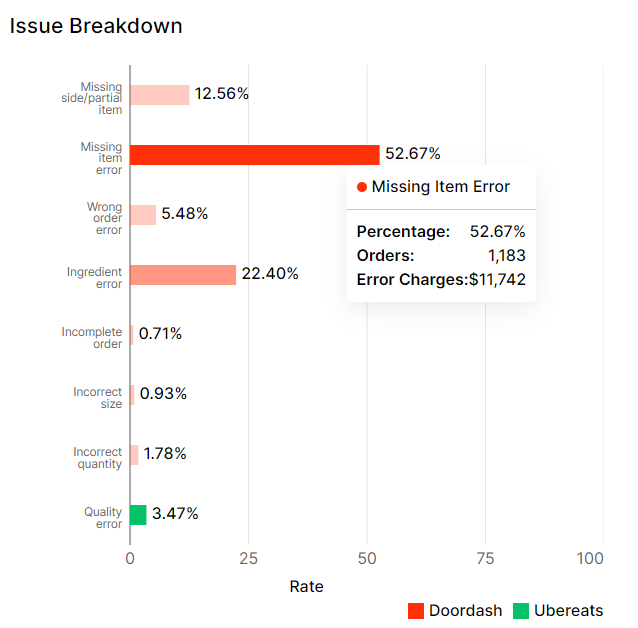
- Issue Breakdown: Detailed insights into prevalent issues, helping pinpoint areas for improvement.
- Operational Trend Graphs: Track trends of inaccurate orders, error charges, and unfulfilled orders to measure operational effectiveness.
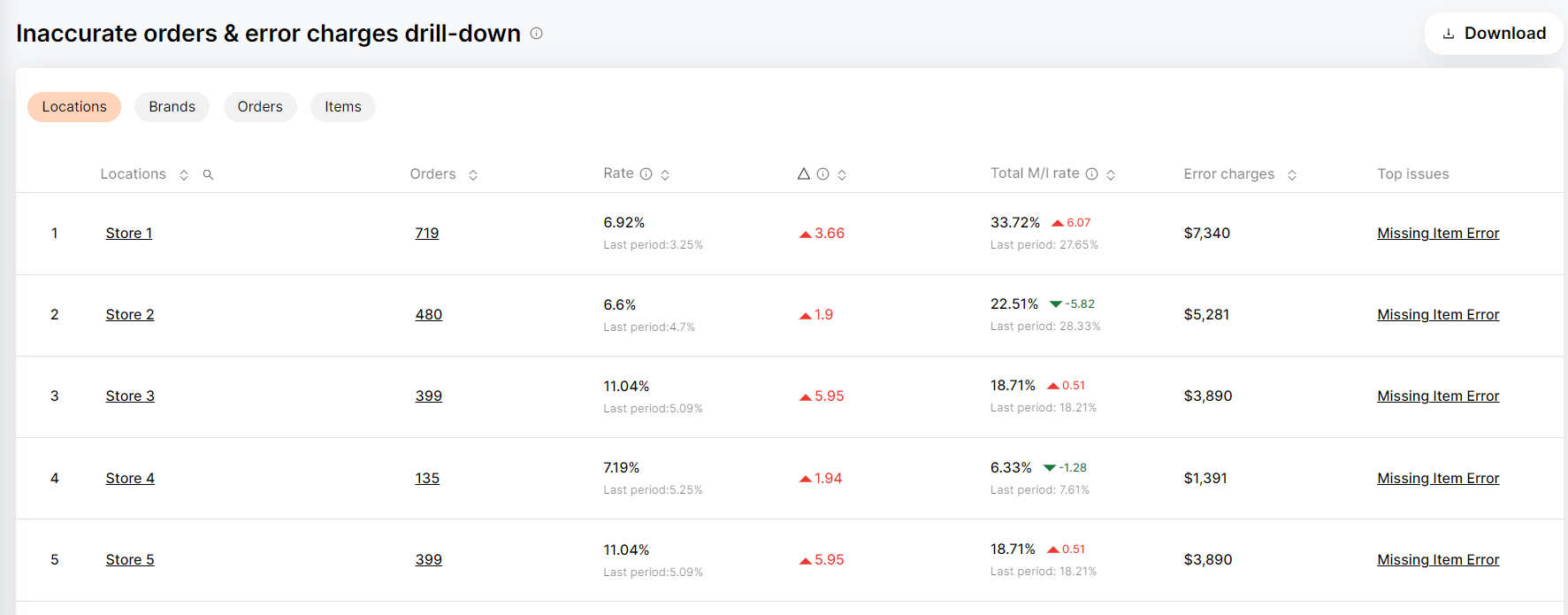
- Drill-Down Analysis: Offers a granular view based on locations, brands, orders, or items. Identify performance outliers, enabling strategic decision-making.
Reviews and Ratings
Features:
- Average Ratings Overview: A consolidated view that showcases the average ratings across various platforms.
- Ratings Trend Visualization: Understand how your ratings are performing over time to identify trends and adapt your business strategy.
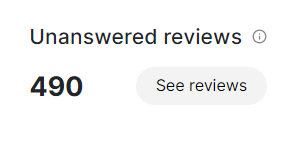
- Unanswered Reviews: Gain insights into reviews that have not been responded to, ensuring no customer feedback is overlooked.
- Detailed Review Analysis: By clicking on "See Reviews", users can dive into individual reviews across platforms like UberEats, DoorDash, and GrubHub. Each review is time-sensitive; if not addressed promptly, the opportunity to respond is lost.
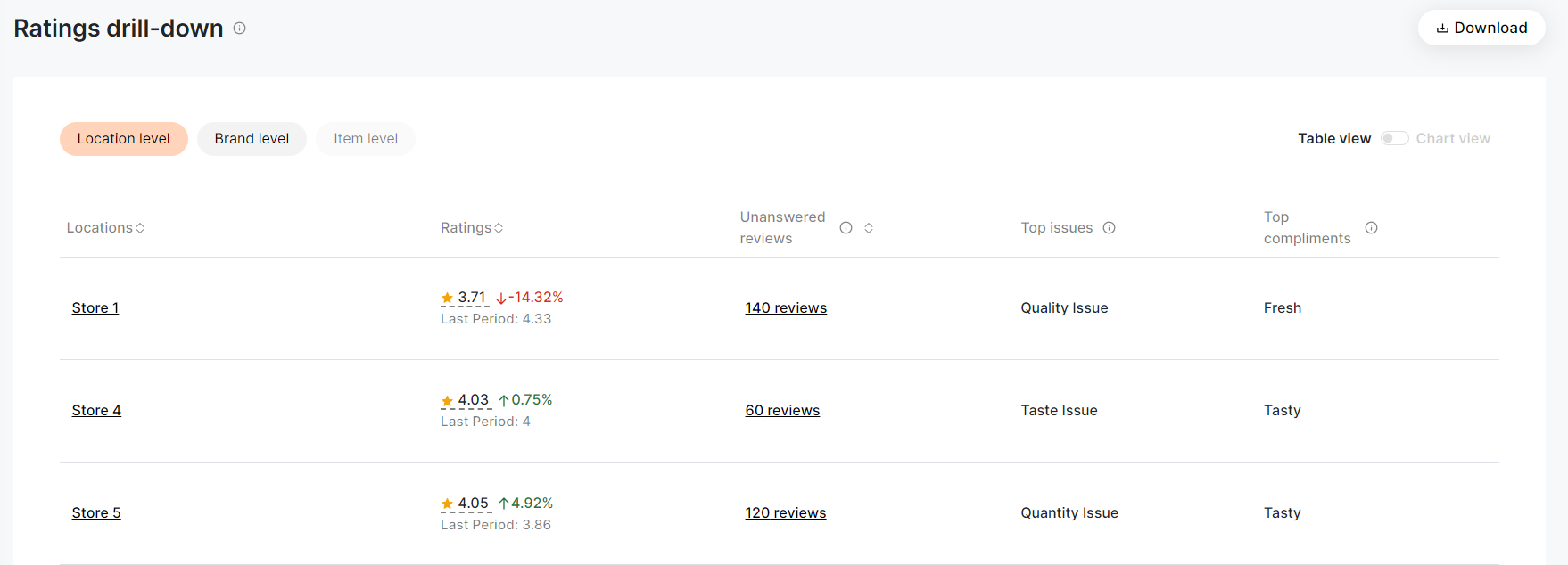
- Ratings Drill-Down: View ratings based on specific parameters such as location, brand, or individual stores. Identify unanswered reviews, top issues, and compliments specific to each store or brand.
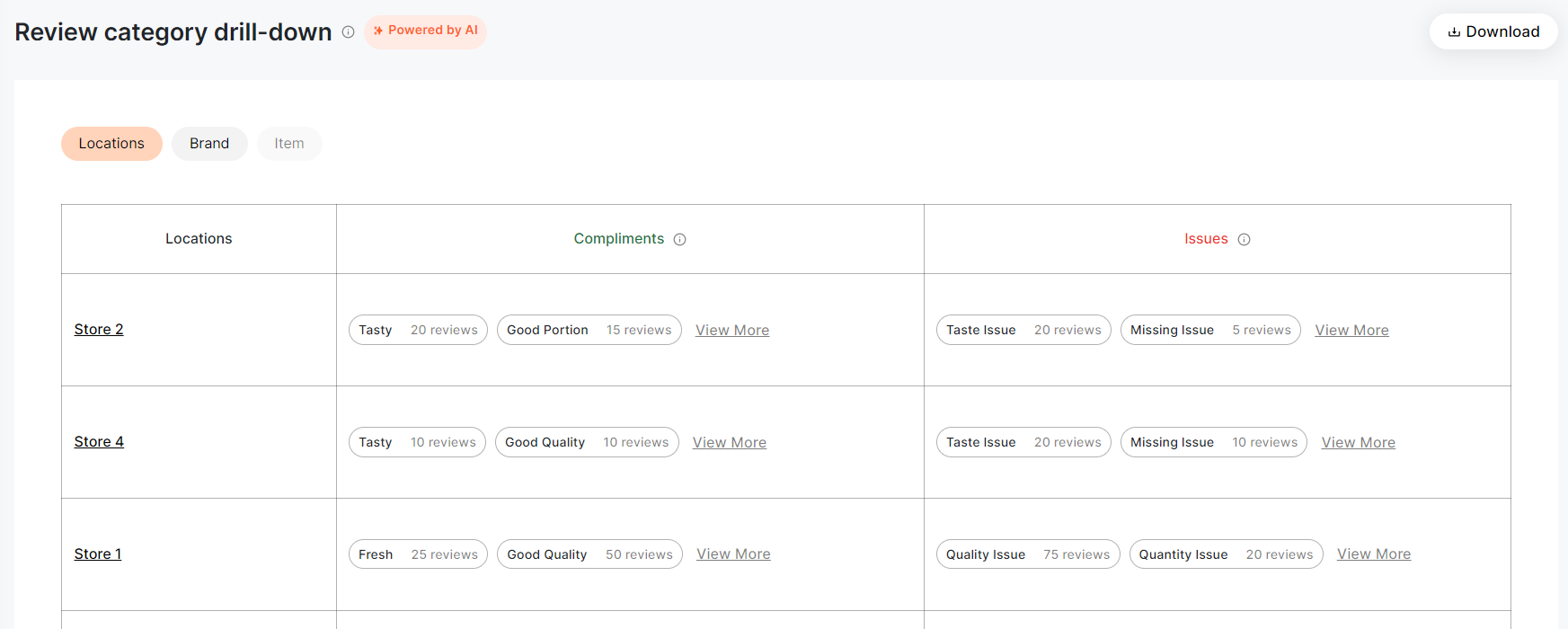
- Review Category Drill-Down (AI-Powered): With the integration of artificial intelligence, this feature classifies compliments and issues, providing insights on key customer sentiments.
- Review Sorting Options: Conveniently sort reviews based on ratings, comments, date, etc., to streamline your analysis.
Best Practices for Reviews and Ratings:
- Zero Unanswered Reviews: Strive to maintain no unanswered reviews. Responding to every customer review fosters trust and potentially mitigates negative perceptions.
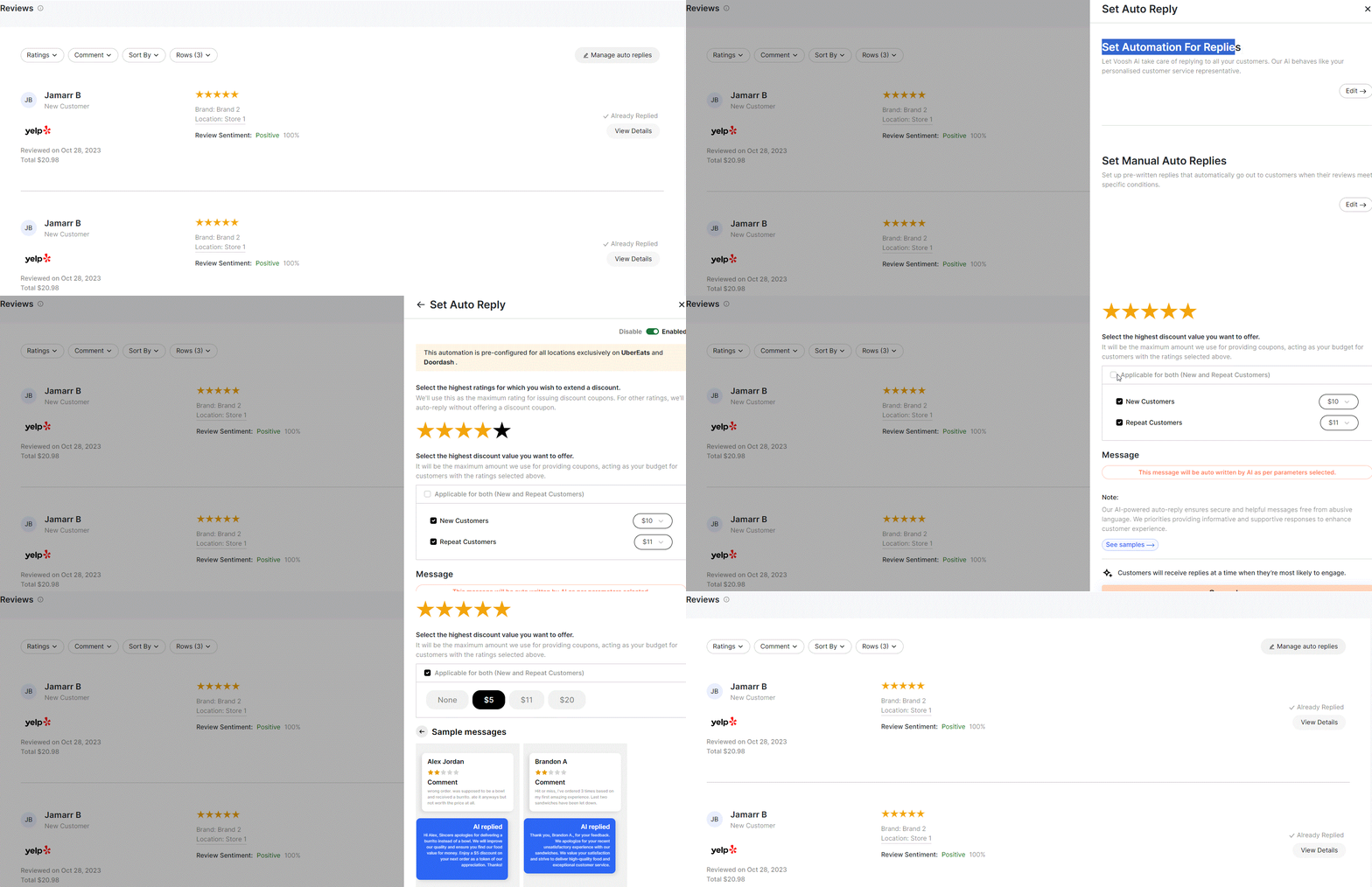
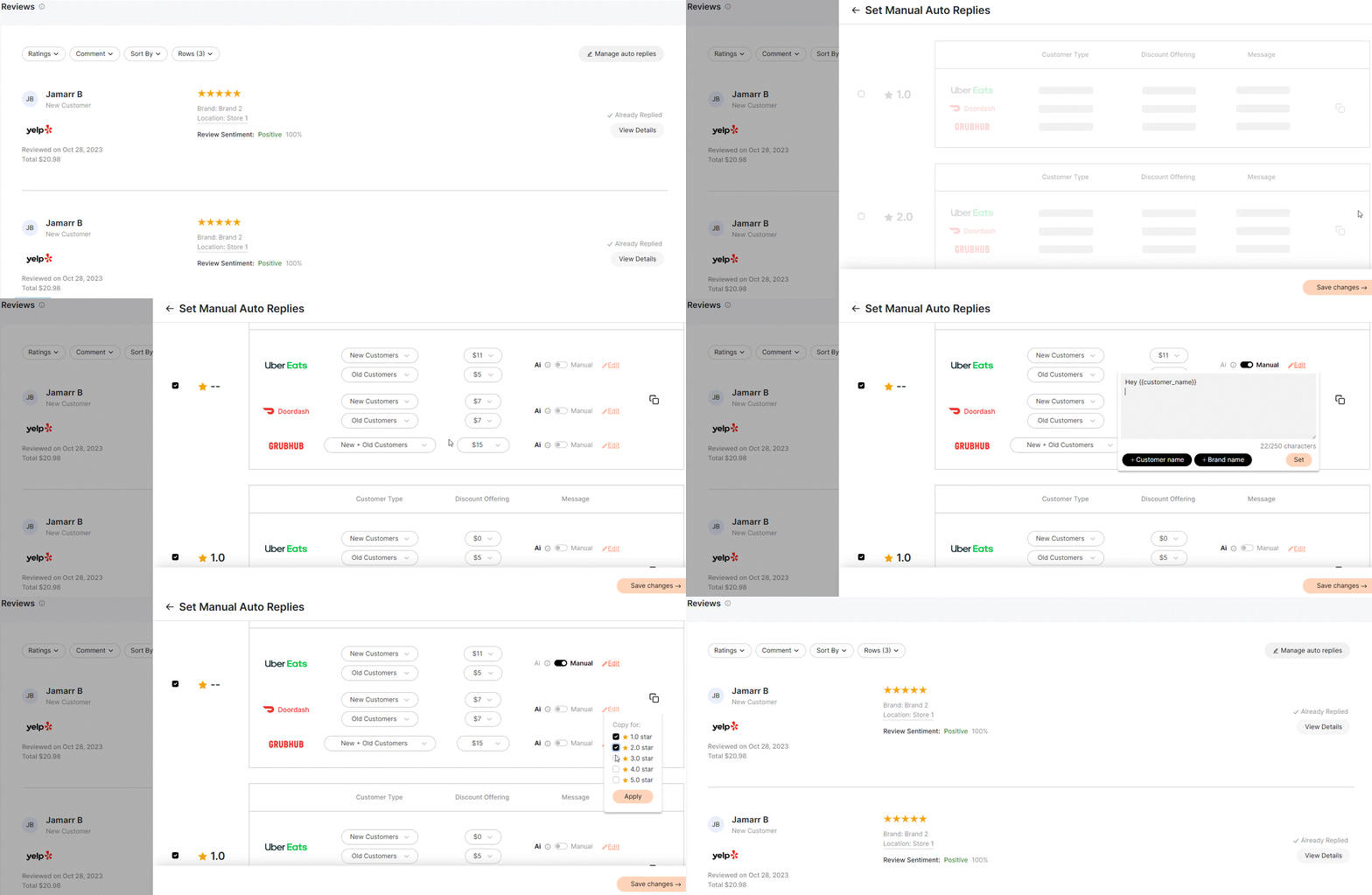
- Set Auto Reply with VOOSH AI: Automate responses using VOOSH AI, which offers personalized replies as if a dedicated customer service representative is addressing the feedback. To set up, click on "Setup" and follow the easy dashboard instructions. You can also incorporate special offers or discounts in these automated replies for enhanced customer engagement.
- Set Manual Auto Replies: For businesses preferring a more personalized touch without manually addressing each review, preset replies can be created to respond automatically when specific conditions in reviews are met.
Dispute Manager
Features:
- Dispute Metrics Overview: A snapshot showing the dispute rate, win rate, lost rate, pending disputes, and more, ensuring businesses have all the critical data at their fingertips.
- Dispute Trends Visualization: View graphical representations of dispute trends, win rates, and potential revenue losses.
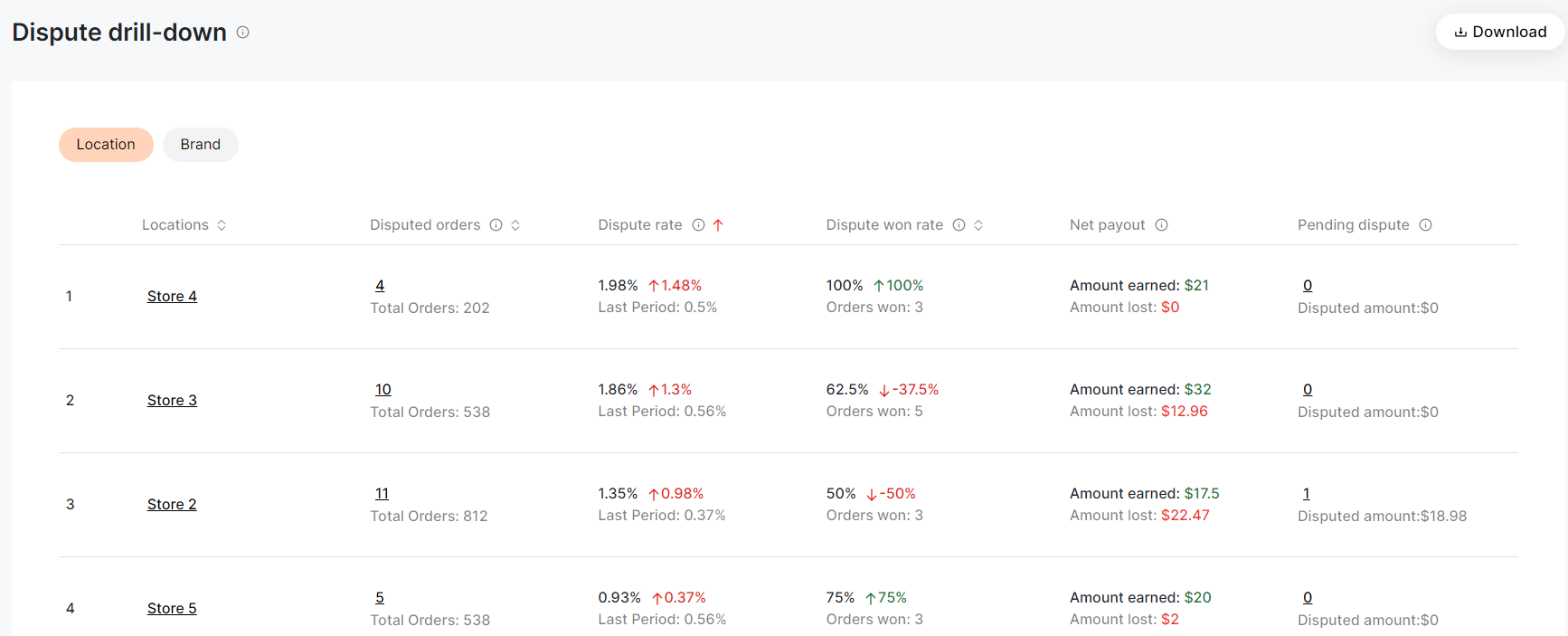
- Dispute Drill-Down: Detailed analysis and data segmentation based on location and brand.
- Disputed Orders Compilation: A comprehensive list of all disputed orders across platforms, highlighting specifics like order location, dispute status, and payouts.

Best Practices for Dispute Manager:
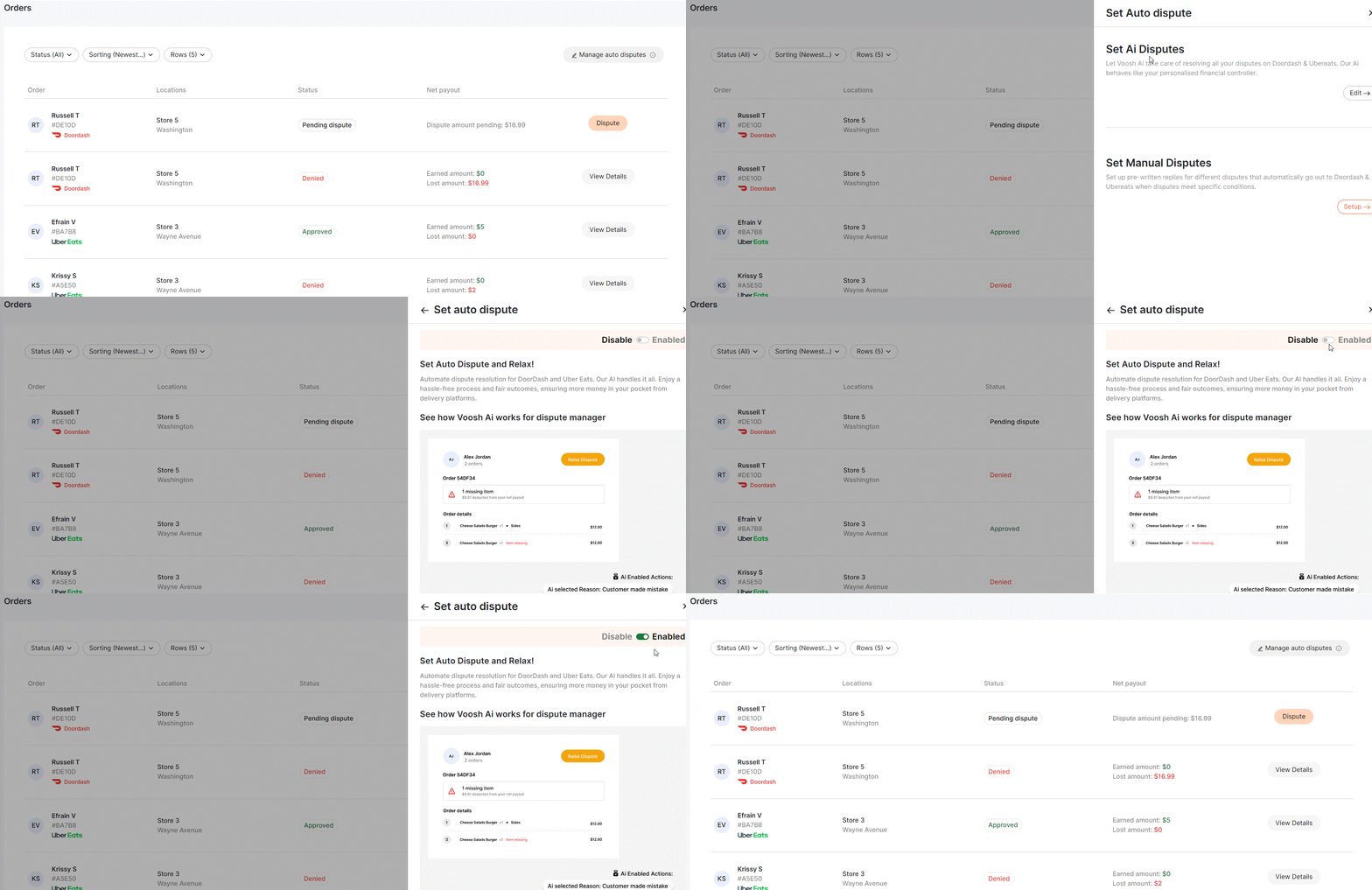
- Set Auto Dispute with Voosh AI: Under “Manage Auto Disputes” option - Enable VOOSH's AI capability to handle disputes automatically, ensuring maximum returns from delivery platforms. This proactive approach not only recovers potential lost revenues but also saves operational time.
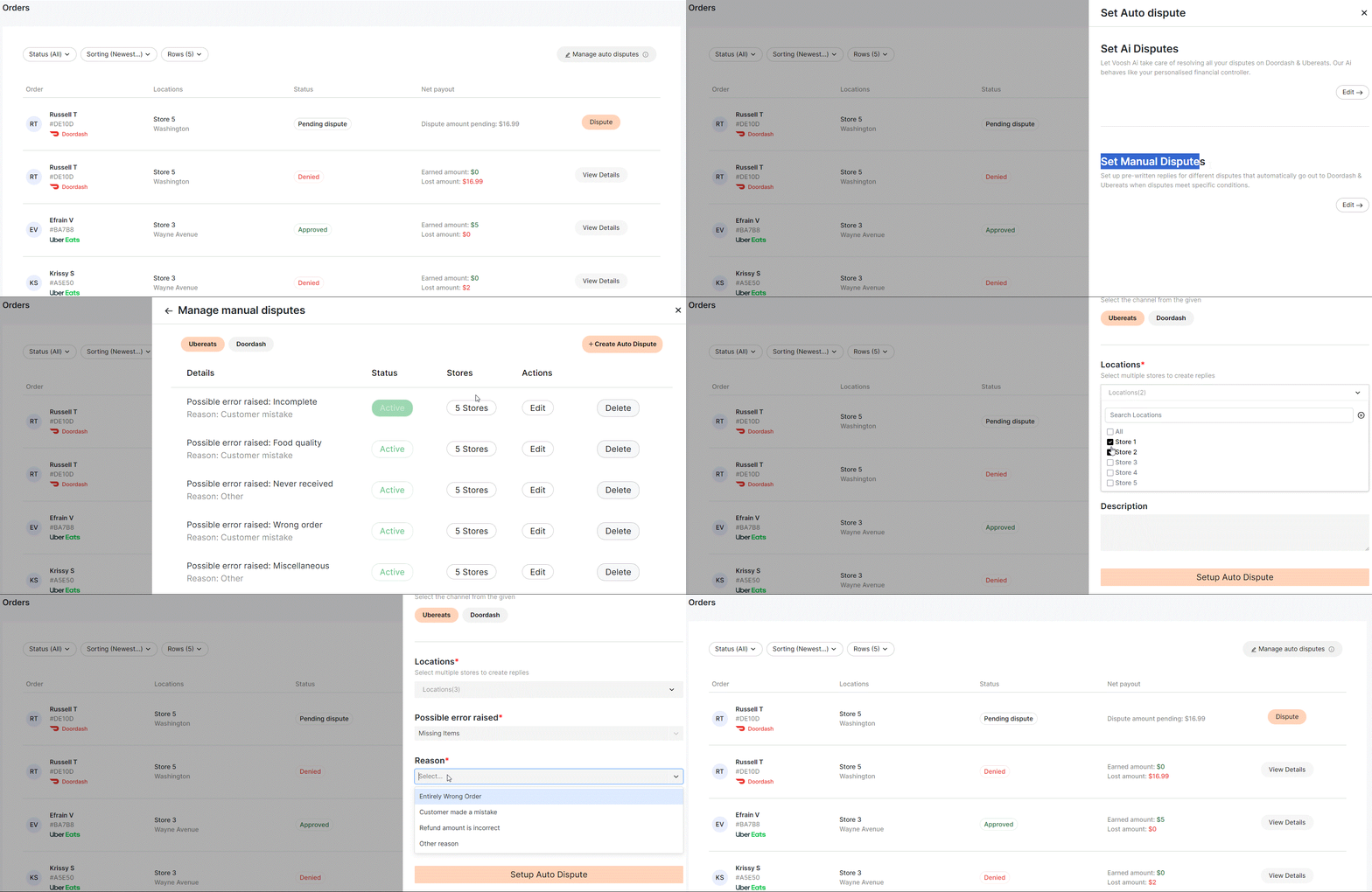
- Set Pre-written Auto Disputes: Establish predefined conditions for automated disputes. By configuring criteria once, businesses can ensure that disputes are lodged whenever specific errors or issues arise, without manual intervention.
Finance
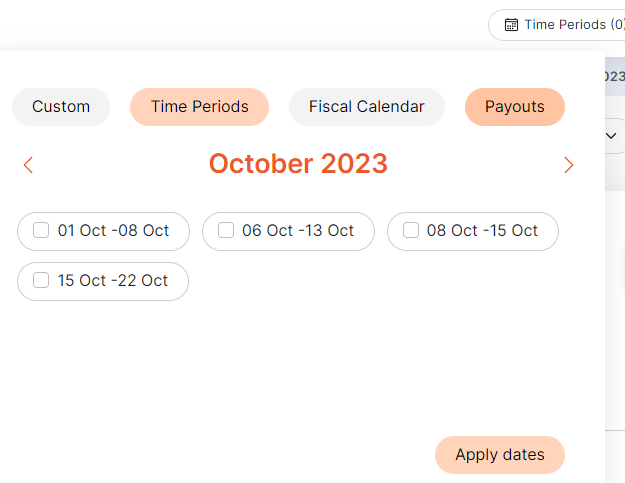
Alternative Date Range Selector: Unique to this dashboard, businesses can opt for “weekly time frames” or select based on “payout dates” for precise financial data.
Features:
- Key Financial Metrics: An overview of order values, platform commissions, merchant deductions, taxes, net payouts, and more.
- Trend Graphs: Visualize financial data trends to make informed decisions.
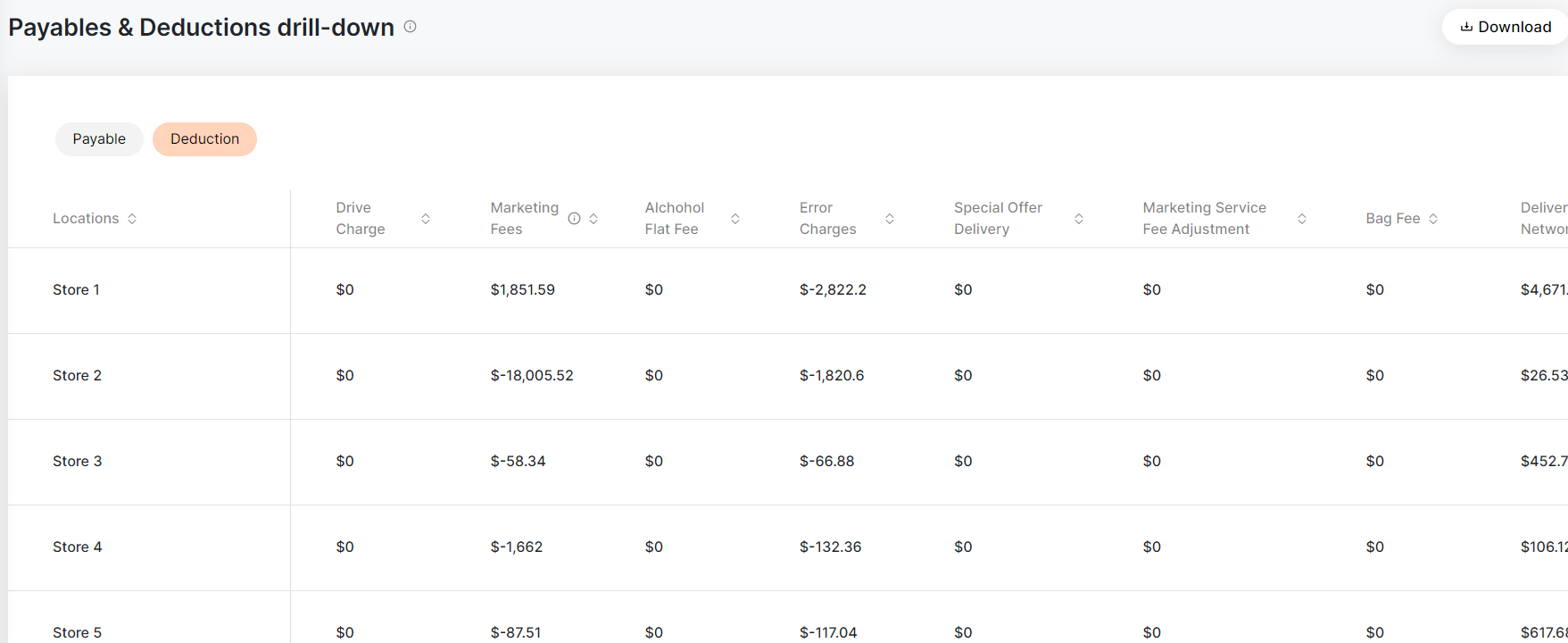
- Payables and Deductions Drill-Down: Analyze payables and deductions across all stores, ensuring full transparency in finances.

Promotions
Features:
- Promotion and Ads Overview: An all-encompassing view of ROI, sales, expenditure on promotions or ads, and listings with lapsed offers.
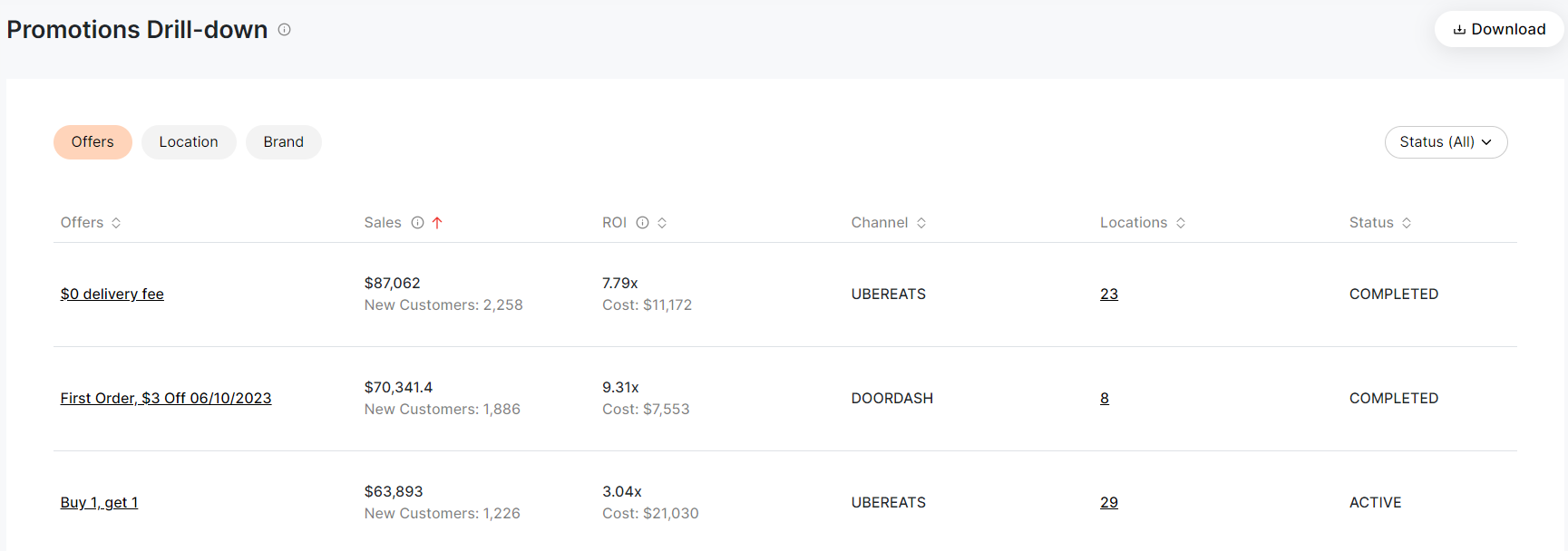
- Promotion Drill-Down: Understand which promotional offers are driving sales and ROI. This section provides details like offer status, associated channels, and activated locations.
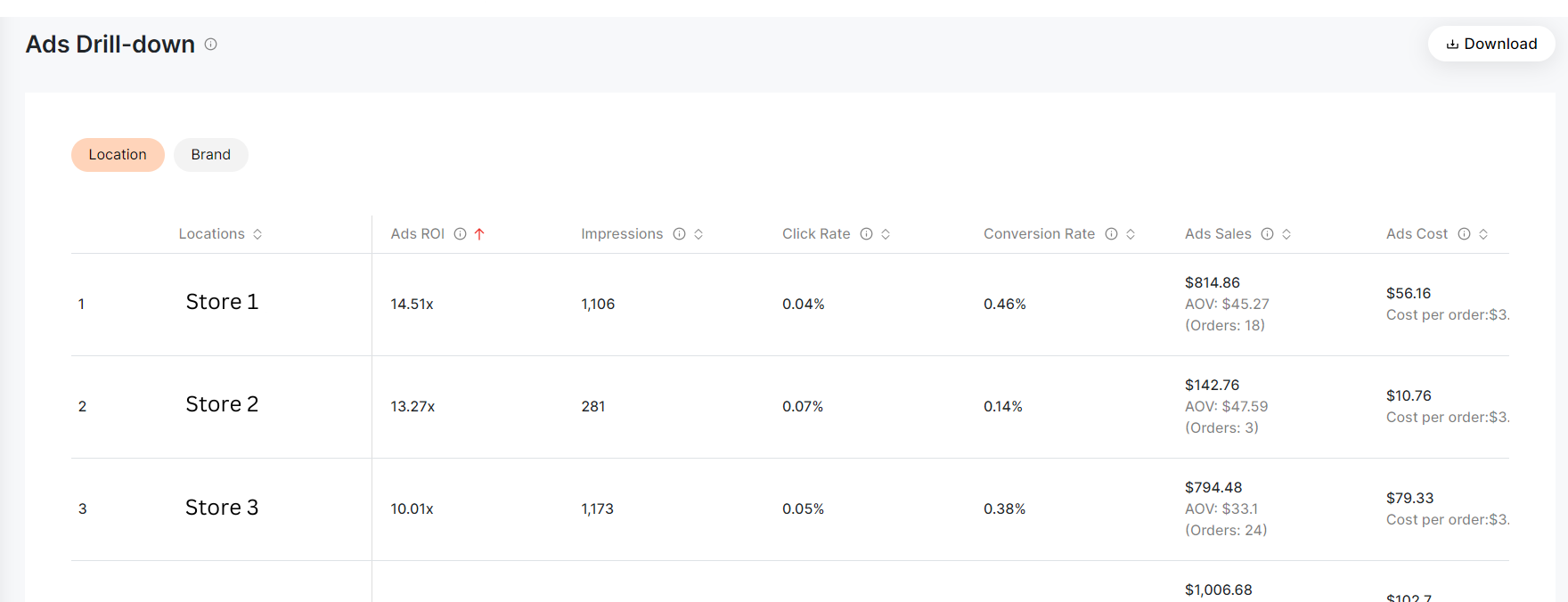
- Ads Drill-Down: Detailed insights into ads, ROI, impressions, click rate, conversion rate, ad sales cost, and more, with filters based on location and brand.
Customer Analysis
Features:
- Customer Metrics Overview: Get insights on total users, new customers, returning customers, and loyal patrons.
- Trend Graphs: Monitor trends in customer behaviors and loyalty.
- Customer Drill-Down: Deep dive into customer data segmented by location, brand, and channel to better understand customer demographics.

Download Reports
Features:
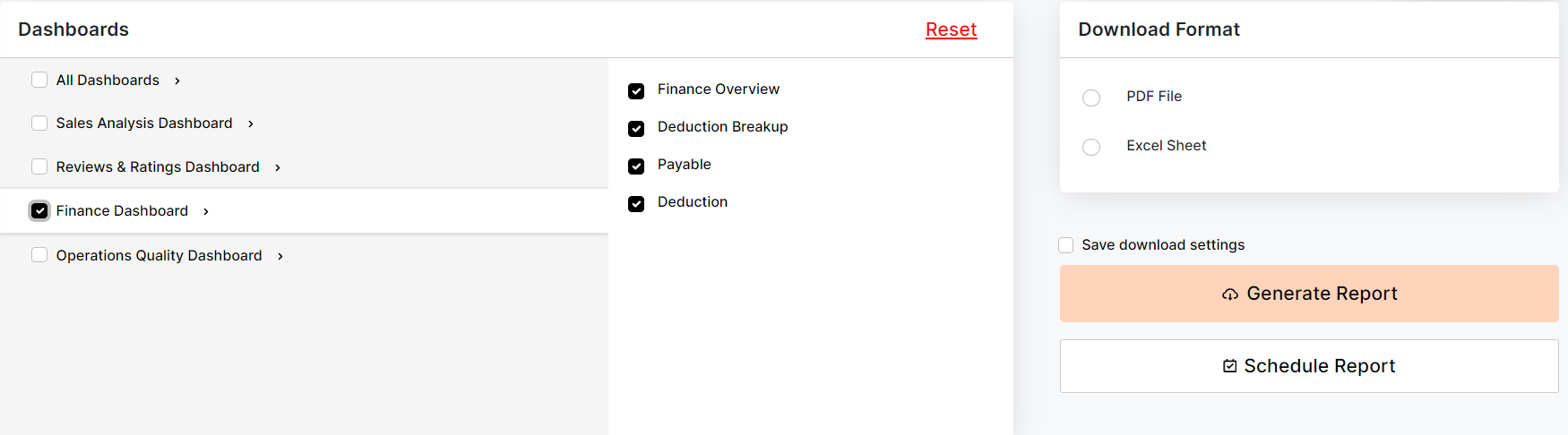
- Generate Reports: Easily download detailed reports in PDF or Excel formats. Choose specific reports, locations, channels, and time periods for customized data.
- Schedule Reports: Automate report generation by scheduling them in advance. Define parameters, set frequency, and Voosh will send out reports as specified.
User Access Control
Features:
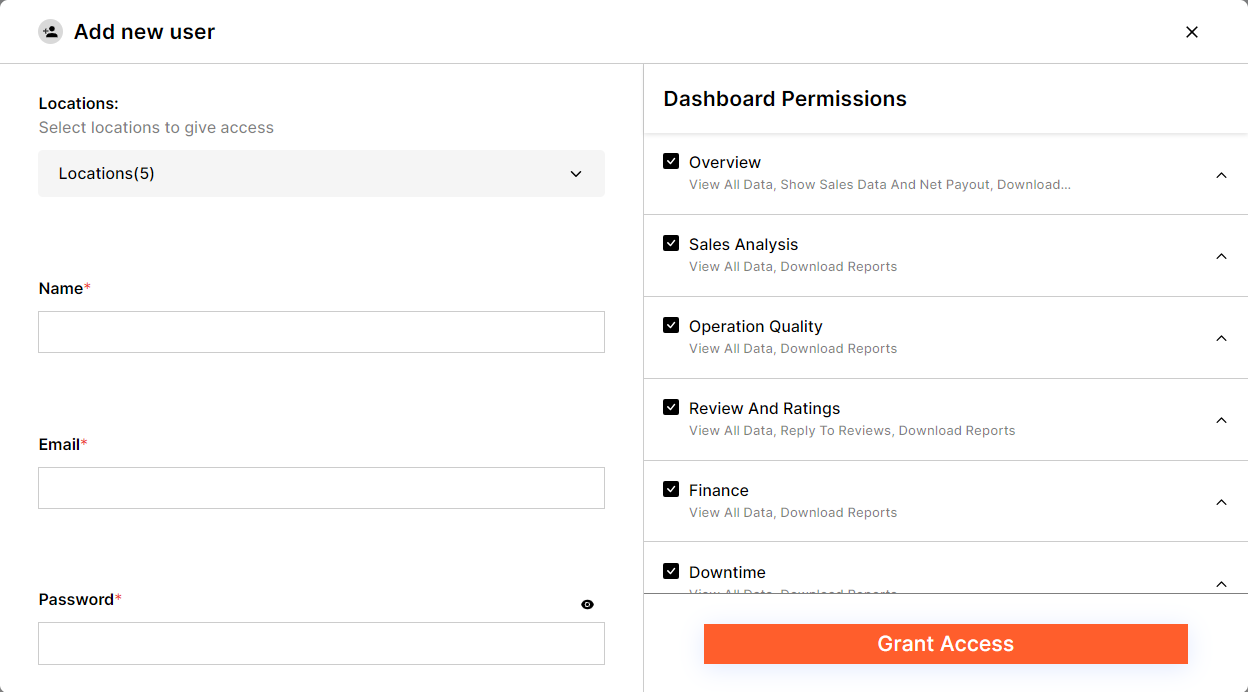
- Manage Users: Add new users and specify dashboard access based on user roles or needs. Control which parts of the Voosh platform individual users can access to ensure data security and relevance.
- This comprehensive guide aims to provide users with a clear understanding of how to utilize the Voosh platform's features optimally. With the integration of artificial intelligence and detailed insights, businesses can enhance their operations and customer engagement strategies effectively.
- Tips for a Seamless Experience:
- Familiarize yourself with the dashboard by exploring all modules.
- Regularly update your date and location filters to get the most recent insights.
- Encourage feedback from your team to identify challenges and improve the platform's usability.